
- Type
- Desktop app
- Released
- Oct 2026
- Source
- Open source ↗
- Get it
- Download ↗
Finder tells me I have more than 100 GB available. A build tool sees roughly 5 GB free and stops. Both can be describing the same disk: some of the space macOS counts as available still needs to be reclaimed.
I built Reclaim to make that difference visible and help clear known sources of developer storage. It is a safety net for the things that accumulate while coding. Project tools should still be responsible for cleaning up their own worktrees and build data.
See what is free now
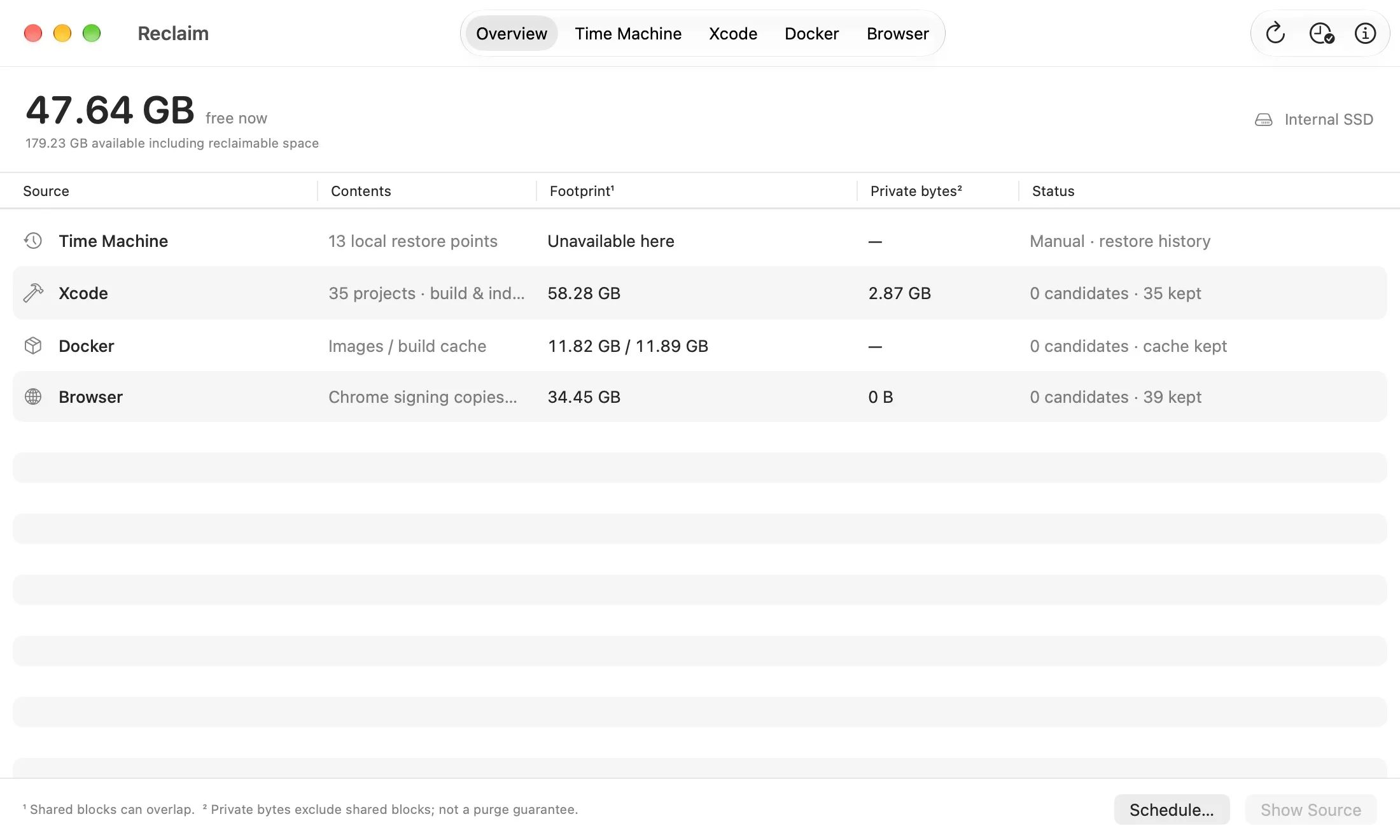
Reclaim puts physically free SSD space first, alongside macOS’s broader available-space estimate. An overview shows local Time Machine snapshots, Xcode build data, Docker usage and Chrome’s temporary signing copies, with a tab for each source.
It looks in specific places rather than scanning the whole disk for large files. Shared file blocks can belong to several copies, so footprints are kept separate from private bytes. Neither is presented as a promise of how much space a cleanup will return.
Keep active work protected
Xcode build data is kept while its source workspace or parent folder exists, or a registered Git worktree still refers to it. Only old, verified orphaned build and index folders can qualify for removal.
Docker images are considered in use if any running or stopped container references them. Reclaim also protects tagged and recent images. Build cache is shown for inspection, with no purge control.
Chrome’s temporary signing copies must be at least a day old and have no matching process or open-file references. If ownership or usage checks are incomplete, Reclaim keeps the data.
Choose when to reclaim
Time Machine controls ask macOS to release local snapshots on the internal startup drive. External and network backups are excluded. Removing a snapshot loses that local restore point, so this always stays a manual decision.
Optional schedules handle eligible Xcode data and Chrome signing copies using the same checks as manual cleanup. Scheduling starts off, and opening the app does not purge anything.
Get Reclaim
Reclaim is free to download and runs on macOS 14 or later. Download the signed, notarised app using the button above, open the DMG, and drag Reclaim into Applications. The latest release also includes a ZIP and checksums. The source and build instructions are on GitHub.
The release build includes Apple Silicon and Intel binaries. Hands-on testing has been on Apple Silicon with macOS 27; older systems and Intel Macs have not yet had the same testing.
Get Reclaim
Make room for your next build